
Charities receiving funds via Charities Trust
If your charity receives funds through Charities Trust, you don't need to submit Gift Aid claims yourself.
Charities Trust will:
Reclaim eligible Gift Aid on your behalf;
Process the claim directly with HMRC; and
Transfer the reclaimed Gift Aid to your charity once it has been received from HMRC less their 4.5% reclamation fee.
This means Gift Aid is managed automatically as part of the Charities Trust disbursement process.
Charities receiving funds via Stripe & Bank transfer
If your charity receives funds through Stripe, Gift Aid is not reclaimed automatically.
Instead, registered charity administrators can download a report from the GiveWheel charity dashboard containing all eligible Gift Aid declarations associated with donations to your charity.
You can then use this information to:
Submit a Gift Aid claim directly to HMRC; or
Upload it to your preferred Gift Aid reclamation service.
How do I access Gift Aid declarations?
If your charity receives funds via Stripe or bank transfer:
Log in to your GiveWheel charity dashboard.
Open Donations reporting.
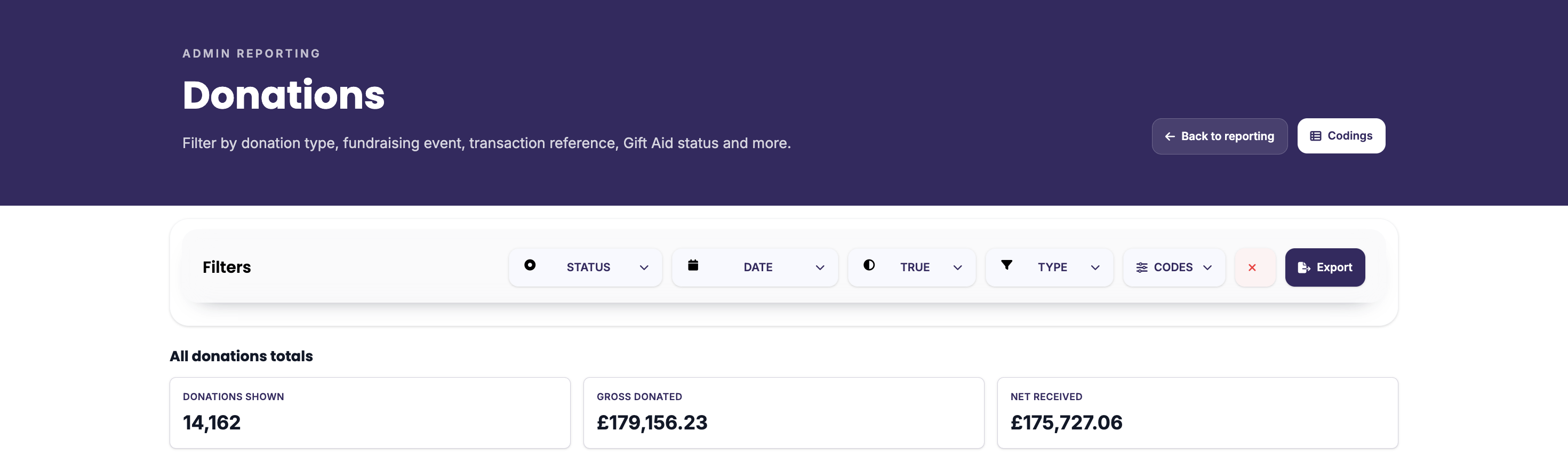
Apply the filter Gift Aid = True, and export the CSV report containing all relevant Gift Aid declarations. See the example screenshot below to view what the 'Donations' section of the charity dashboard looks like:
Why are Gift Aid claims handled differently?
The Gift Aid process depends on your chosen payout method:
Charities Trust | Charities Trust reclaims Gift Aid on your behalf. |
|---|---|
Bank transfer | Your charity reclaims Gift Aid directly using the reports available in your GiveWheel dashboard. |
Stripe | Your charity reclaims Gift Aid directly using the reports available in your GiveWheel dashboard. |
Need help?
If you're unsure which payout method your charity uses, or have any questions about Gift Aid declarations, contact our support team at support@givewheel.com and we will be happy to help.